Vue框架
Vue
Vue是一套用于构建用户界面的渐进式框架。
Vue优点
- 易用:上手相较React和Anglar来说更简单。
- 灵活:渐进式技术。
- 性能好:采用虚拟DOM、双向数据绑定等技术。
示例代码
1
2
3
4
5
6
7
8
9
10
11
12
13
14
15
16
17
18
19
20
21
22
23
24
25
26
27
<html lang="en">
<head>
<meta charset="UTF-8">
<meta name="viewport" content="width=device-width, initial-scale=1.0">
<title>Document</title>
<!-- 引用Vue.js文件 -->
<script src="./lib/vue.js"></script>
</head>
<body>
<div id="app">
<!-- 获取msg中的数据并展示 -->
{{msg}}
</div>
<script>
// 创建Vue对象,挂载到上面div(id:app)中
Vue.createApp({
data(){
return {
msg: 'Hello!',
}
}
}).mount('#app')
</script>
</body>
</html>Vue指令
v-bind(可用“:”代替)
数据绑定
1
2
3
4
5
6
7
8
9
10
11
12
13
14
15
16
17
18
19
20
21
22
23
24
25
<html lang="en">
<head>
<meta charset="UTF-8">
<meta name="viewport" content="width=device-width, initial-scale=1.0">
<title>Document</title>
<script src="./lib/vue.js"></script>
</head>
<body>
<div id="app">
<a v-bind:href="url" :title="title">百度</a>
</div>
<script>
Vue.createApp({
data(){
return {
title: '百度一下',
url: 'https://www.baidu.com'
}
}
}).mount('#app')
</script>
</body>
</html>v-on(可用“@”代替)
事件绑定
1
2
3
4
5
6
7
8
9
10
11
12
13
14
15
16
17
18
19
20
21
22
23
24
25
26
27
28
29
30
31
32
33
34
<html lang="en">
<head>
<meta charset="UTF-8">
<meta name="viewport" content="width=device-width, initial-scale=1.0">
<title>Document</title>
<script src="./lib/vue.js"></script>
</head>
<body>
<div id="app">
<button @click="btnNext">下一张</button>
<button @click="btnBack">上一张</button>
</div>
<script>
Vue.createApp({
methods: {
btnNext() {
this.i += 1;
if (this.i > 2){
this.i = 0;
}
},
btnBack() {
this.i -= 1;
if (this.i < 0){
this.i = 2;
}
}
}
}).mount('#app')
</script>
</body>
</html>v-if
判断
1
2
3
4
5
6
7
8
9
10
11
12
13
14
15
16
17
18
19
20
21
22
23
24
25
26
27
28
29
<html lang="en">
<head>
<meta charset="UTF-8">
<meta name="viewport" content="width=device-width, initial-scale=1.0">
<title>Document</title>
<!-- -->
<script src="./lib/vue.js"></script>
</head>
<body>
<div id="app">
<h3 v-if="score > 90">优秀</h3>
<h3 v-else-if="score >= 90">优秀</h3>
<h3 v-else-if="score >= 70 && score < 90">良好</h3>
<h3 v-else-if="score >= 60 && score < 70">及格</h3>
<h3 v-else>不及格</h3>
</div>
<script>
Vue.createApp({
data(){
return {
score: 91
}
}
}).mount('#app')
</script>
</body>
</html>v-for
数据遍历
1
2
3
4
5
6
7
8
9
10
11
12
13
14
15
16
17
18
19
20
21
22
23
24
25
26
27
28
29
30
31
<html lang="en">
<head>
<meta charset="UTF-8">
<meta name="viewport" content="width=device-width, initial-scale=1.0">
<title>Document</title>
<!-- -->
<script src="./lib/vue.js"></script>
</head>
<body>
<div id="app">
<ul>
<li v-for="(item, index) in dataList" :key="index">{{item}}</li>
</ul>
</div>
<script>
Vue.createApp({
data(){
return {
dataList: [
"张飞",
"关羽",
"刘备"
],
}
}
}).mount('#app')
</script>
</body>
</html>v-model
用于数据双向绑定,data中定义的数据发生变化时,页面中的数据也跟着变化。修改页面中的数据时,data中的数据也跟着变化。
1
2
3
4
5
6
7
8
9
10
11
12
13
14
15
16
17
18
19
20
21
22
23
24
25
<html lang="en">
<head>
<meta charset="UTF-8">
<meta name="viewport" content="width=device-width, initial-scale=1.0">
<title>Document</title>
<!-- -->
<script src="./lib/vue.js"></script>
</head>
<body>
<div id="app">
<input type="text" v-model="score">
</div>
<script>
Vue.createApp({
data(){
return {
score: 85
}
}
}).mount('#app')
</script>
</body>
</html>
MVVM开发模式(Model-View-ViewModel的简写)
Vue是一种采用MVVM开发模式的框架,简化DOM开发操作。
Model:模型,要操作的数据。
View:视图,页面结构。
ViewModel:视图模型,连接Model和View的桥梁。
CompositionAPI
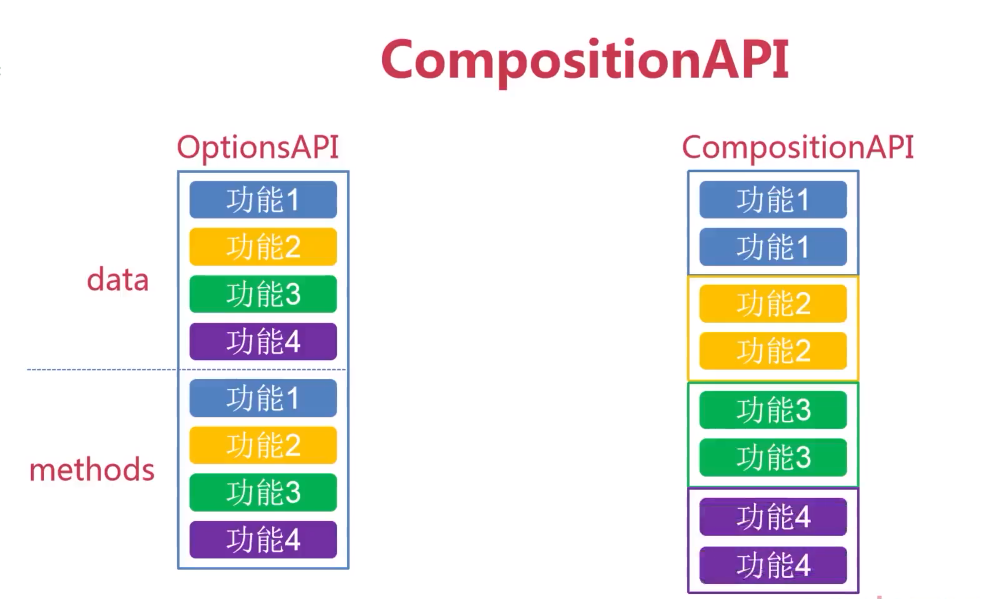
Vue2采用的是OptionsAPI,Vue3采用的是CompositionAPI,Vue3兼容Vue2的OptionsAPI。
响应式数据声明
分为**ref()和reactive()**两种声明方式。
**setup()**是CompositionAPI的入口函数。
通过**ref()和reactive()**声明的数据必须在Setip中return。
ref()响应式数据声明方式
通常用来定义简单数据类型(数值型、字符串等)。
1
2
3
4
5
6
7
8
9
10
11
12
13
14
15
16
17
18
19
20
21
22
23
24
25
26
27
28
29
30
31
32
<html lang="en">
<head>
<meta charset="UTF-8">
<meta name="viewport" content="width=device-width, initial-scale=1.0">
<title>Document</title>
<!-- -->
<script src="./lib/vue.js"></script>
</head>
<body>
<div id="app">
<h3>姓名:{{name}}</h3>
<h3>年龄:{{age}}</h3>
姓名<input type="text" v-model="name"/>
年龄<input type="text" v-model="age"/>
</div>
<script>
const { ref } = Vue;
let name = ref('小明');
let age = ref(20);
const app = {
setup() {
return {name, age};
}
}
Vue.createApp(app).mount('#app')
</script>
</body>
</html>reactive()响应式数据声明方式
通常用来定义复杂数据类型(数组、对象)。
1
2
3
4
5
6
7
8
9
10
11
12
13
14
15
16
17
18
19
20
21
22
23
24
25
26
27
28
29
30
31
32
33
34
35
36
<html lang="en">
<head>
<meta charset="UTF-8">
<meta name="viewport" content="width=device-width, initial-scale=1.0">
<title>Document</title>
<!-- -->
<script src="./lib/vue.js"></script>
</head>
<body>
<div id="app">
<ul>
<li>ID:{{state.id}}</li>
<li>姓名:{{state.name}}</li>
<li>年龄:{{state.age}}</li>
</ul>
</div>
<script>
const { reactive } = Vue;
let state = reactive({
id: 1001,
name: "张三",
age: 18
})
const app = {
setup() {
return {state};
}
}
Vue.createApp(app).mount('#app')
</script>
</body>
</html>
Vue生命周期
生命周期:挂载、更新、销毁。
Vue实例的生命周期会伴随各种事件,这些事件对应的函数叫做生命周期函数/生命周期钩子/生命周期钩子函数。
生命周期函数会在某一时刻自动运行。
本博客所有文章除特别声明外,均采用 CC BY-NC-SA 4.0 许可协议。转载请注明来自 CodeWhale-Blog!
评论